Curbside Mods
Small mods for The Sims 3 that each do one thing and leave the rest of the game alone, and a client that installs and updates them for you.
Download the client 1.13Sims 3 packs and pricesA small installer: Start menu shortcut, updates in place, uninstall from Settings. Prefer a single file with nothing to install? Download the portable exe. Windows may show a blue “protected your PC” box the first time: click More info, then Run anyway. It appears for any downloaded program that is not signed.

The mods
10 so far. Each one is built on the game’s own systems rather than replacing them, touches only the household you are playing, and writes nothing to your saves.
- 01

Autopayv1.0
Turn it on and the bills are paid the moment they arrive, with a note of what it cost.
What it does
Pays your household's bills the moment they arrive, if the family can afford them, and tells you with a one-line message: "Bill paid: §242". It is off until you turn it on: on the cell phone or a computer, under "Curbside..." then "Autopay...", choose "Turn on Autopay".
Notes
Only the household you are playing is affected, and the on/off choice is kept with each save. Removing the mod removes everything it does. Tested on game version 1.67.
- 02

Lifelinev1.0
Saves the game on its own once an hour, through the game's own Save, so a crash never costs more than that.
What it does
Saves your game on its own, once an hour. On the cell phone or a computer, under "Curbside..." then "Lifeline...", you can switch to every 30 minutes or every 2 hours, pause it, and see its version. A brand-new game that has never been saved gets one reminder to save it by hand first; after that Lifeline takes over.
Notes
The hour is real time, not game time, and the count starts when a game is loaded. While the game is paused, nothing is saved because nothing changes. If a dialog is open or a save is already running when the hour comes, it waits a few minutes and tries again.
- 03

EmergencyServicesv1.0
Calls the fire brigade on a fire, the police on a burglar and the repairman on a breakage, each only once you switch it on.
What it does
Makes the calls you would make yourself. Switch on what you want, on the cell phone or a computer under "Curbside..." then "Emergency Services...": the fire brigade is called the moment a fire starts at home, the police the moment a burglar is on the lot, and the repair service when something breaks.
Notes
Only the household you are playing is affected, and the three switches are kept with each save. Removing the mod removes everything it does. Tested on game version 1.67.
- 04

HandySimv1.2
Handy Sims, or Sims with Handiness 4 or better, fix the broken things at home on their own.
What it does
Handy Sims fix the broken things in their own home on their own. A Sim with the Handy trait, or with Handiness at level 4 or better, who is idle at home while something on the lot is broken, goes and repairs it without being told, one thing after another until the lot is fixed. On the cell phone or a computer, under "Curbside..." then "HandySim...", you can pause the mod and see its version.
Notes
Only the household you are playing is affected, and only on its home lot. Teens and older. Objects another Sim is using are left alone. No save file is changed. Removing the mod removes everything it does. Tested on game version 1.67.
- 01

NaturalHackerv1.2
A Computer Whiz hacks on their own, at any hour, for a sensible while.
What it does
Lets a Sim with the Computer Whiz trait choose to hack on their own, at any hour, the same way they choose to play computer games. A hack runs about two and a half game hours and then ends by itself. The game can still interrupt it for a need, and the Sim can still be caught. On the cell phone or a computer, under "Curbside..." then "NaturalHacker...", you can pause the mod and see its version.
Notes
Only Sims with the Computer Whiz trait are affected. No save file is changed. Removing the mod removes everything it does. Tested on game version 1.67.
- 02

StickyFingersv1.1
Kleptomaniacs steal when they visit, using the game's own swipe.
What it does
Lets a Sim with the Kleptomaniac trait steal on their own whenever they are visiting another lot, and not only at night. The game already lets kleptomaniacs swipe things when nobody is in the room with them; this mod takes the clock off it and makes them a little keener. On the cell phone or a computer, under "Curbside..." then "StickyFingers...", you can pause the mod for a while and see its version.
Notes
Only Sims with the Kleptomaniac trait are affected. No save file is changed. Removing the mod removes everything it does. Tested on game version 1.67.
- 03

Sweetheartsv1.3
Sweethearts on the same lot WooHoo on their own; married couples try for a baby.
Not for use with NRaas_Woohooer.
What it does
Sims who are going steady, engaged, or married may WooHoo autonomously when their partner is on the lot and a double bed, shower, or elevator is available. Married couples try for a baby instead, including same-sex couples, unless birth control is active.
Birth control can be started or stopped from a phone or computer under "Curbside..." then "Sweethearts...", and the setting is saved. The game handles WooHoo, pregnancy, jealousy, and privacy normally, and everything remains available for manual use.
Notes
Hot tubs and other expansion WooHoo locations aren't supported. Not compatible with NRaas Woohooer. Tested on game version 1.67.
- 01

Legacyv1.1
Keeps the rules and the score of the Legacy Challenge for one family.
What it does
Keeps the score and the rules of the Sims 3 Legacy Challenge (simslegacychallenge.com) for one family. Start it from the founder's cell phone or a computer, under "Curbside..." then "Legacy Challenge...", for a young adult, adult or elder man living alone on his own lot; it records the founder, the lot and generation 1 and asks which trait is the family trait. From then on nobody can move, a window at each birth asks whether the baby is the heir, life fruit, death flowers, Ambrosia and the banned lifetime rewards are undone, a toddler who has learned to walk, talk and use the potty is offered aging up, and the score (generations, lifetime wishes, portraits, net worth and lifetime happiness) is kept and shown on the phone. "Write Legacy stats to a file" puts the whole record in your Sims 3 documents folder, and it is written for you when generation 10 is born and when you stop. Everything else in the rules is up to you.
Notes
The challenge's record and stats are kept inside the save file. Tested on game version 1.67 with Into the Future installed.
- 02

RunawayTeenv1.3
The Runaway Teen Challenge: school cancelled, travel charged, stats kept.
What it does
Runs the Runaway Teen Challenge for you. On the teen's cell phone or a computer, under "Curbside..." then "Runaway Teen Challenge...", "Run Away" makes a teen living with family a household of one on an empty lot in town, with 50 simoleons and a bicycle, and starts the challenge; name a lot with "Runaway" in Edit Town first to choose it. "Start" does the same for a teen already living alone. While it runs the teen skips school, unless you allow it from the phone, and each taxi ride costs 10 simoleons; biking and walking are free. The challenge is won the day the runaway becomes a young adult, and the stats (the money and where it came from, trips, school days skipped, the aging settings and whether they changed) are written to a file in your Sims 3 documents folder, or on demand from the phone. "Refund travel charges" gives the taxi money back. Everything else in the rules is up to you.
Notes
The challenge will not start for a Kleptomaniac. The challenge's state and stats are kept inside the save file. Tested on game version 1.67 with Into the Future installed.
- 01

CurbsideCorev1.0
A core mod with one change: the game's Try For Baby is offered to same-sex couples like any other. Sweethearts needs it.
What it does
A core mod: a copy of one of the game's own code libraries (Sims3GameplaySystems) with one line changed, which the game loads in place of its own. The change: the game's Try For Baby test no longer refuses a same-sex couple, so the option the game already offers to any other couple, married or not, is offered to them too. Everything else in the library is exactly as the game shipped it. Sweethearts 1.3 needs this installed; on its own it changes only that one answer.
Notes
Built from game version 1.67 (the EA app build). A different game version needs a different copy; if the game updates, uninstall this until a matching Curbside Core is published. Only one core mod for this library can be loaded at a time. If you run another mod that replaces Sims3GameplaySystems, choose one.
The client
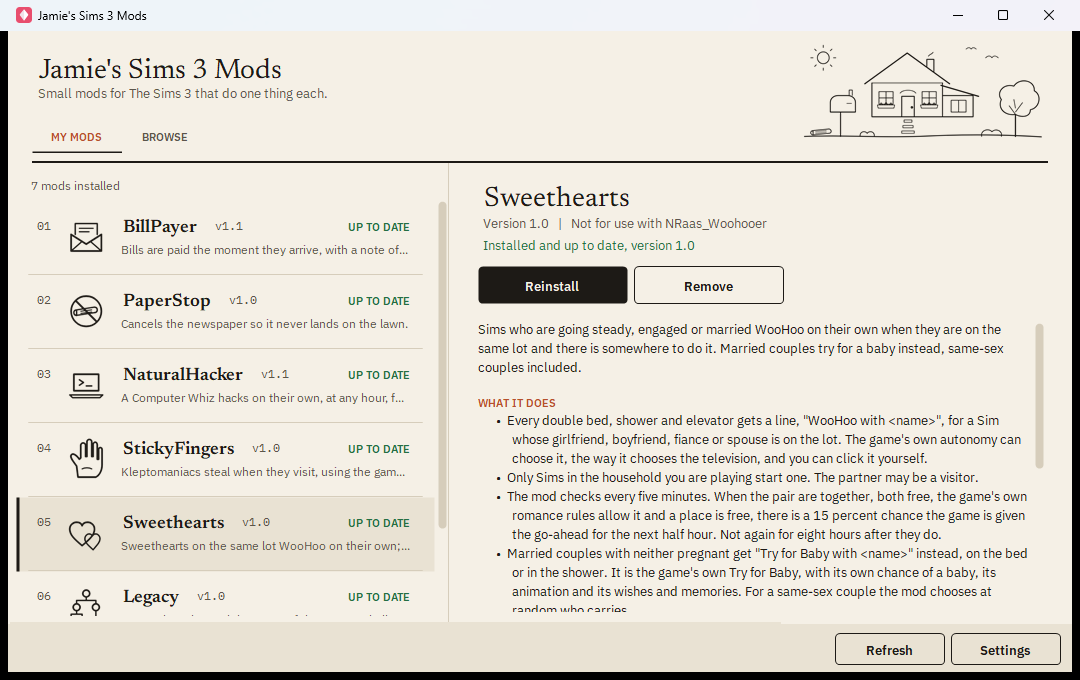
- Download the client, save it anywhere and run it. It finds your Sims 3 folder on its own, and sets up the Mods folder if you have never used mods.
- Browse and read what each mod does. Pick one and press Install. The game must be closed while a mod is installed or removed.
- Play. Nothing is written to your saves; remove a mod and the game is as it was.
- Update by opening the client now and then. A newer version of a mod shows on its card.
When the client fetches the mod list it tells the site a random id and the names of the mods it has installed, nothing else, so Jamie can see how many people use it and which mods. The site keeps the counts and drops the ids each night. Switch it off under Settings in the client.
This site is not endorsed by or affiliated with EA or its licensors. The Sims is a trademark of Electronic Arts Inc.